


OptumRx
4.37.87K Reviews
App Specs
- Version
- 4.57.1
- Updated On
- License
- Free
- Downloads
- 1,000,000+
- Developer
- Optum Inc.
- Categories
- Medical
- Platform
- Android, iOS
Screenshots
 Analysis by AppCompare
For a first-time user, the most useful way to think about OptumRx is as a place to handle pharmacy-benefit tasks on your phone, rather than as a general health app. I’d start with one practical goal—checking a prescription or understanding how to manage a refill—and learn the rest only when it becomes relevant. That keeps the first visit focused and makes it easier to tell whether the app fits the way you get your medication.
What to expect from a pharmacy-benefit app
OptumRx is a free medical app from Optum Inc. It is aimed at people who want to take a more active role in their pharmacy benefits. That focus matters: it is most useful when you already have a reason to manage prescriptions through OptumRx, not simply because you want a general place to read about health.
The app has been available since January 28, 2015, and its current version is 4.55.0. It is rated for Everyone and requires Android 8.0 or later. Its 4.3 average from around 55,000 ratings, along with over 1 million installs, suggests that many people use it, though popularity alone cannot tell you whether its tools match your particular plan or pharmacy needs.
I’d set expectations around convenience, not medical decision-making. An app can help organize the administrative side of prescriptions, but it should not replace advice from a clinician or pharmacist. If you are deciding whether to start, stop, or change a medicine, use professional guidance rather than treating an app screen as a diagnosis.
Getting started without turning setup into a project
When you install it, take a moment to check that you have the account and plan details you normally use for pharmacy benefits. Follow the app’s sign-in steps, then look for the part that corresponds to your immediate need. I prefer this small, task-first approach to tapping through every menu before I know what I want to accomplish.
If your main goal is a refill, begin by locating the prescription and checking its displayed status before starting another request. That simple pause can help you distinguish a medicine that needs action from one already moving through the process. If you are setting up the app for someone else, make sure you have their permission and that the account information belongs to the right person; prescription details are personal, and a mistaken account can create needless confusion.
For a first visit, it also helps to know what question you want answered. “Can I take care of this refill?” is more manageable than “How does every part of my pharmacy benefit work?” Once you have completed one small task, you can decide whether to explore further or return only when you need the app.
Worth Reading Before You Choose

EA SPORTS FC Mobile 26 Is a Bigger Football Game, but It Takes Time

Flipboard Shows What News Apps Must Do Beyond the Feed

Switching to Android Auto Means Rethinking Your Driving Routine

Google Calendar Makes a Crowded Week Easier to Manage

Ludo King Makes the Most of the Minutes Between Plans

Baby Panda World Brings Quick Play to Modern Phones, but Its Game Library Feels Busy
Your first useful task: check before you act
Suppose you are getting ready for a busy week and notice that a regular prescription may be running low. I’d open the app, find the relevant prescription, and read its status before making plans around it. If the next step is clear, follow the available instructions; if it is not, use the app’s support route or contact the pharmacy rather than guessing. The win is not merely tapping a refill button—it is avoiding an unnecessary trip or a last-minute scramble by checking early.
That early check is especially worthwhile before travel, a change in routine, or a weekend when it may be harder to sort out a delay. It gives you time to ask questions while there is still room to make another plan. I would not wait until the day a medicine runs out to learn how the app handles a particular prescription.
Where it can feel less straightforward
Pharmacy benefits are tied to your plan and prescription circumstances, so a screen that looks simple may still lead to a question the app cannot settle on its own. A status update is helpful, but it is not a guarantee that a medication is ready at a particular place or time. Before setting out, check the latest information and confirm directly with the pharmacy when timing matters.
Another common source of frustration is expecting every prescription to follow the same path. A refill, a transfer, and a delivery-related question are different tasks; the right next step can depend on the details of the prescription. If an option is unavailable or the wording is unclear, pause and ask for help instead of repeating the same action. That is a more sensible use of a support channel than trying random menu choices.
Compared with calling a pharmacy, an app can make routine checks easier to fit into a spare moment. A phone call, however, is often better when you need a person to interpret a complicated situation or resolve an exception. I see these approaches as complements: use the app for straightforward account tasks, and choose direct contact when the answer depends on context that a screen cannot explain.
Navigating the Interface
First things first, when you open up OptumRx, you’re greeted with a clean and straightforward interface. It’s like the app designers knew exactly how to keep things user-friendly. The menus are intuitive, and honestly, it didn’t take me long to find my way around. If you’ve ever used a pharmacy app before, this one will feel like a breeze.
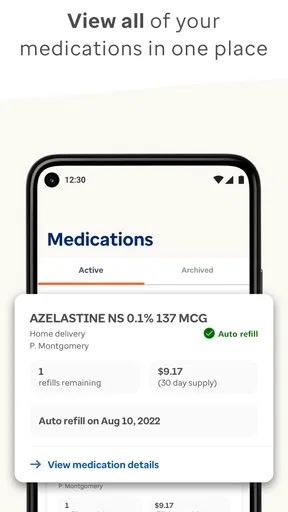
The color scheme is easy on the eyes, which I appreciate during those late-night med checks. Plus, the dashboard gives you a snapshot of your prescription status, pending orders, and even your medication history. It’s kind of like having your medical cabinet right in your pocket.
Managing Prescriptions
Now, this is where OptumRx really shines. Managing prescriptions is super smooth. You can easily refill your medications with just a few taps. I love that you can set reminders for when it’s time to take your meds or reorder them. They’ve thought of everything!
There’s also an option to transfer prescriptions from other pharmacies, which is a lifesaver if you’re switching providers. The app automatically updates your prescription status, so you’re never left wondering if your meds are ready for pick-up. No more surprise trips to the pharmacy, yay!
Exploring the Features
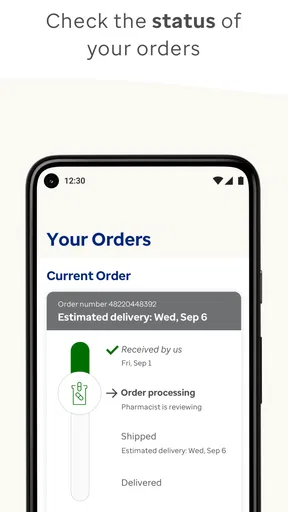
One of the cool features I discovered is the ability to track your order. I mean, who doesn’t love knowing exactly when their package is going to arrive? With this app, you can see the delivery status and get notifications about any updates. It’s perfect for those of us who like to plan ahead.
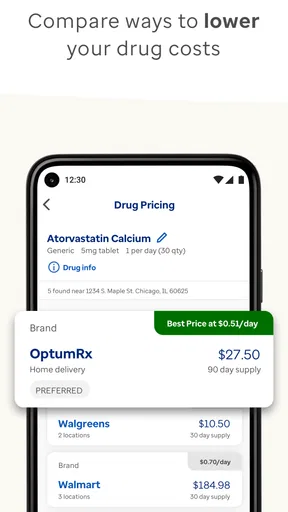
The price comparison tool is another standout feature. It lets you compare prices for different medications, which is a huge plus if you’re budget-conscious. It’s like having a personal shopping assistant for your meds, ensuring you get the best deal every time.
Making the most of the tools
To get more value from prescription tracking, I would check the status at a predictable point in my routine—say, when planning the week—rather than repeatedly opening the app to look for changes. That turns a useful status screen into a simple habit without making medication management feel like another job. If a delivery is involved, check early enough to ask about an unexpected delay instead of assuming that a notification means the package has arrived.
Price comparisons are best treated as a prompt to ask a better question, not as a final answer in isolation. Before changing where you fill a prescription, compare the option shown with the practical details that matter to you, such as whether the pharmacy is convenient and whether the prescription can be handled there. A lower displayed price is only useful if the route works for your circumstances. If cost is the concern, I’d use the comparison to guide a conversation with the pharmacy or benefits support rather than make a change based on one screen alone.
Reminders can help when a regular schedule slips your mind, but they work best as backup, not as a substitute for following the instructions provided for your medicine. I’d keep the reminder tied to a clear action—taking a dose or checking whether a refill is due—so it does not become background noise. If a notification seems inconsistent with the instructions from your clinician, follow the clinician’s directions and ask for clarification.
Accessing Health Information
OptumRx doesn’t just stop at managing prescriptions. It also provides a bunch of health resources. From drug interactions to side effects, you can access a wealth of information right from the app. It’s great to have everything in one place instead of scouring the internet for reliable sources.
And if you’ve got questions, there’s a handy chat feature where you can get in touch with a pharmacist. I found this particularly useful when I was unsure about a medication dosage. It’s comforting to know there’s professional support just a tap away.
Who will get the most from it
I’d recommend trying it if you already manage prescriptions connected with OptumRx and want a more convenient way to check their progress, keep an eye on orders, or handle routine benefit-related tasks. It can also suit someone helping a family member organize the practical side of prescriptions, provided they have the person’s permission and are careful to keep the right account details separate.
It is a less obvious fit for someone who gets all prescriptions through a different pharmacy-benefit arrangement and has no reason to use OptumRx. In that case, the pharmacy’s own app or the service associated with the person’s plan may be more relevant. Likewise, someone who prefers to discuss every refill with a pharmacist may find a phone call more reassuring than managing the process on a screen.
If you are comparing it with a general health or medication-tracking app, the distinction is purpose. A general tracker may be a better choice for recording medicines regardless of where they are filled; OptumRx is more specifically useful for pharmacy-benefit and prescription tasks. I would not expect one app to replace the other for every person. Choose based on whether your main problem is keeping a personal list or handling the pharmacy side of a prescription.
Questions worth settling before relying on it
A natural first question is whether you need to understand the whole benefit system before using the app. I don’t think so. Start with one clear task, such as checking a prescription, and use the information you see to decide whether the next action is obvious. If the task depends on plan-specific details, ask through the appropriate support route rather than assuming the same process applies to every medicine.
You may also wonder whether an app status means you can go straight to the pharmacy. I would treat it as a useful indication, then confirm with the pharmacy if a wasted journey would be a problem. Status information helps with planning, but direct confirmation is the sensible choice when you need certainty about collection timing.
For a question about side effects, interactions, or how a medicine should be taken, the health information and pharmacist contact can be a helpful starting point. They do not make it wise to change a dose on your own. If you have a serious or urgent medical concern, seek appropriate medical care rather than waiting for an in-app exchange.
Final Thoughts
All in all, my experience with OptumRx has been pretty awesome. It takes the hassle out of managing prescriptions and offers features that genuinely make life easier. Whether you’re tech-savvy or not, the app is designed to meet your needs without any unnecessary complications.
So, if you’re looking for a reliable way to manage your medications and stay informed about your health, I’d say give OptumRx a try. With its user-friendly interface and slew of helpful features, it might just become your new favorite pharmacy companion. Happy health managing!
A practical next step
My advice is to install it when you have a few quiet minutes, sign in, and check one prescription you already understand. Note what the app says, decide whether you need to act, and contact the pharmacy or a pharmacist if the next step is unclear. That first small success is a better test than browsing every feature: you’ll quickly see whether the app saves you effort in your own routine.
Overall, I see this as a handy companion for people whose pharmacy tasks fit its purpose, not a must-have for everyone who takes medication. Used with sensible checks and professional advice when needed, it can make the everyday administrative side feel more manageable. If your pharmacy needs are served elsewhere, or you would rather handle each question directly with a person, choosing that route is perfectly reasonable.
Pros
- Easy prescription refills with just a few taps.
- Secure login ensures your data stays protected.
- Offers medication reminders to stay on track.
- User-friendly interface simplifies navigation.
- Access to detailed drug information and costs.
Cons
- Occasional app crashes during peak times.
- Limited availability of customer support chat.
- Some features require strong internet connection.
- Notifications can be overly frequent for some users.
- Prescription transfer process can be slow.
FAQs for OptumRx
What is OptumRx and what services does it offer?
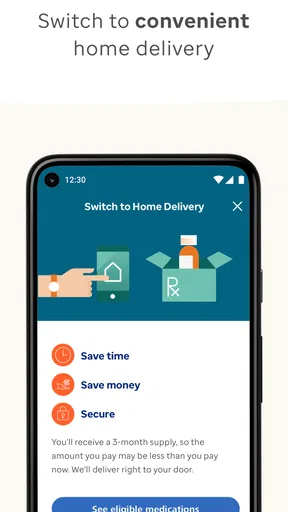
OptumRx is a pharmacy care services app designed to help users manage their prescriptions and medications efficiently. It offers features such as home delivery of medications, prescription management, and medication reminders. Users can also access their prescription history, check medication costs, and find pharmacy locations. The app aims to simplify the process of managing healthcare needs.
How user-friendly is the OptumRx app for managing prescriptions?
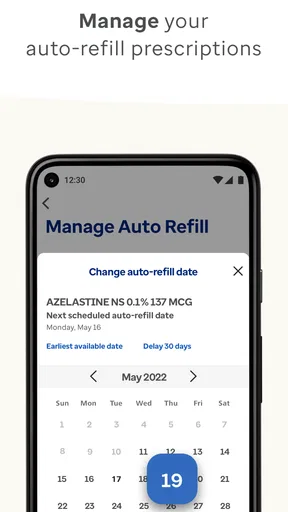
OptumRx is designed with user convenience in mind, featuring an intuitive interface that makes managing prescriptions easy. Users can quickly refill prescriptions, set up automatic refills, and receive notifications for medication reminders. Additionally, the app provides detailed instructions on medication use, making it straightforward for users to manage their health effectively.
Can I track my medication orders through the OptumRx app?
Yes, OptumRx allows users to track their medication orders directly within the app. Once an order is placed, users can view the status of their shipment, including estimated delivery dates. This feature ensures that users have up-to-date information about their orders, helping them plan their medication schedules accordingly.
Is OptumRx secure and does it protect my personal information?
OptumRx prioritizes user privacy and security, employing industry-standard encryption to protect personal and prescription information. The app complies with healthcare regulations such as HIPAA, ensuring that users’ data is handled with the utmost care. This commitment to security provides peace of mind for users managing their healthcare needs through the app.
What are the system requirements for installing the OptumRx app?
The OptumRx app is available for both Android and iOS devices. For optimal performance, Android users should have version 6.0 or higher, while iOS users should have version 11.0 or later. The app is regularly updated to enhance functionality and security, so users should ensure their device’s operating system supports these updates.


